Ansible Project-Based Training
Infrastructure Trainings
•
Simon Izydorek
•
4h
About Training
In this training, we explore Ansible not just as an IaC tool, but as a DevOps enabler through a project-based perspective. Instead of theoretical modules, this workshop focuses on real-world use cases you’re likely to encounter in DevOps environments.
Participants will work through mini-projects that integrate Ansible with Docker, Kubernetes, and other modern infrastructure components.
By the end of the session, attendees will have hands-on experience with applying Ansible in real workflows.
The next slides show the exemplary scenarios from the training.
Training Overview
Automate NGINX setup and basic web server deployment using Ansible
Integrate Ansible with Docker to automate containerized service deployments
Use Ansible with Kubernetes for basic cluster automation (e.g., deploying a pod)
Build a complete project: Automate Jenkins deployment inside Docker with Ansible
Understand production-grade workflows for scalable and maintainable Ansible automation
This project-based format made the learning process highly effective, engaging, and directly applicable to real DevOps challenges.
Paulina Dubas - Founder @Dubas Consulting
Docker Management

Create a dedicated role for Docker
Using docker_image module get Jenkins and Promtheus images
Use docker_container module to build the container from it
Create a Docker network
Security Automation

Requirements:
Ensure SSH key-based authentication is enabled
Ensure no password login
Enabling Firewall
Allow traffic on specific port
Updating Packages
K8S Control Plane (pre)Installation
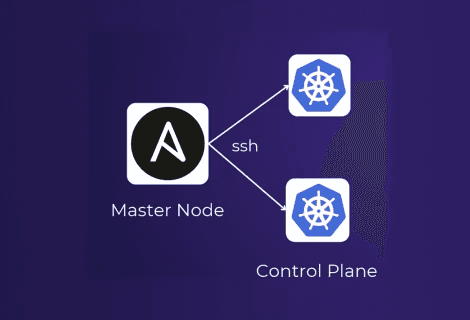
Requirements:
Start and Enable Docker
Install Kubernetes Tools
Disable all swap spaces
Load required kernel modules
Inform user to run kube init
Automate Kubernetes with Ansible

Requirements:
Get Cluster Namespaces Info
Print All Pods Names
Create K8s Namespace
Deploy Nginx via Deployment
Expose Nginx via NodePort Service
Helm Deployments with Ansible on Minikube

Requirements:
Install Helm
Install Jenkins from Helm
Install Grafana from Helm
Verify repo list
Running Ansible from CI/CD

Requirements:
Running Ansible from CI/CD
Installing Jenkins
Building simple Playbok
Integrate Webhook
Category
Infrastructure Trainings
Duration
2h Demo / 4h Workshop
Trainer

Simon Izydorek
Specialization: Ansible, Docker, Kubernetes, DevSecOps, Linux, Falco.
Experience: Over 10 years in IT. Designed, implemented, and maintained infrastructure for global leaders such as Nokia, Tieto, and Thales. Regular speaker at prestigious industry conferences (DevOpsDays Aarhus, DevOpsDays Geneva, Linux Session, SO/DO Poland).