🚀 Intro
Among all of the possible base images … How to choose the right for your Dockerfile? Should you choose Debian or maybe Busybox would be fine? And … Why not OpenJDK?
We have many to choose from like distroless, Alpine, Debian or python and node.
But why it even matter, and why should we care? The answer below…
Press enter or click to view image in full size

In this article, I will guide you through how to choose the right Docker image.
This article is part of a longer series on Docker engineering, but I regularly write about all DevOps-related technologies.
You can read about Ansible, Jenkins or Kubernetes project below:
Now, to further expand our engineering skills, knowledge and portfolios, I decided to show and explain what we should take under consideration while be select base images.
In this week article we will review few options for base images while discussing their pros and cons!
You probably know at this point that a Docker image is a frozen snapshot of an operating system, built in layers, while the Docker container is running an instance of that image.
When we start a container with docker run command, Docker adds a thin read-write layer on top of the image layers but you might know that from the previous articles.
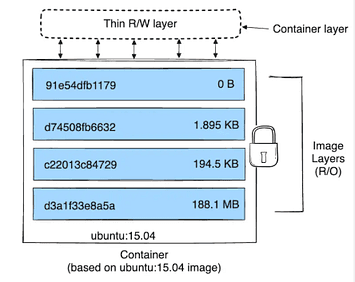
Docker Image structure
Images are immutable, meaning once they’re built, they don’t change. This is what makes Docker so powerful — you can run the same image on any machine and get the same environment every time.
On top of it, Docker images can be versioned, shared, and stored in registries like Docker Hub or private registries.
This makes it easy to reuse images, roll back to previous versions, and distribute consistent environments across development, testing, and production.
Let’s keep things simple and enjoyable today when we talk about base image selection
1️⃣ Section — What a Base Image Actually Is?
Think of a base image as the foundation of your container. It includes three main things:
The operating system — the Linux distro or minimal OS your container will run on.
The runtime your app needs — for example, Python, Node.js, or Java.
The system libraries your app relies on — anything your application depends on to run.
So what does it mean for us?
If you pick a bloated base image, you get a bloated container.
If you pick the right base image, you get a clean, stable, minimal, and fast image.
It really is that simple. No magic.
When you define a Dockerfile, you specify the base image using the FROM instruction. For example:
This tells Docker to start your container image with the Python 3.12 slim image as the base. From there, in your Dockerfile you can add your app code, dependencies, and configurations on top of it and so on.
Other examples:
By choosing the right base image in the FROM line, you are setting up the foundation for everything that comes next — your dependencies, your app, your performance, and even your security. This is your staring point.
So let’s dive into how to actually choose the right one.
2️⃣ Section — What Parameters Should We Consider?
There are many different parameters we can look at. When you’re choosing a base image, think about these key parameters.
Press enter or click to view image in full size

Let’s start with security.
1. Security
First and foremost — smaller images have fewer packages, which results in fewer potential security vulnerabilities.
Distroless and Slim images are great here because they include only what your application really needs.
For example, if you’re building a simple Python Flask application, there’s no need to start from a heavy Ubuntu image and install Python manually. Instead, use language-specific base images like python:3.12-slim, which are kept minimal and receive regular security updates.
While Alpine is very small, it can cause compatibility issues with Python packages that rely on native C extensions, so python:3.12-slim is typically the safer and more compatible choice for most Flask apps.
2. Size
Your base image determines most of your final total image weight.
for start — Alpine is extremely small.
Debian / Ubuntu are larger but more compatible.
Distroless is tiny, but harder to debug.
Smaller images pull and deploy faster, and use less storage.
3. Maintenance & Updates
When it comes to long-term maintenance, choosing the right base image can save you hours or even days of work over the lifetime of your project.
Official language images — like python, node, ruby, golang, openjdk — are maintained by the language communities and Docker maintainers.
This means:
they receive frequent security patches,
they track the latest runtime releases,
they fix compatibility issues,
and they follow predictable versioning schedules.
All of this dramatically reduces the maintenance burden
If you pick an unofficial or outdated base image, you become responsible for every layer yourself — meaning you must manually patch vulnerabilities, update packages, and ensure compatibility with new language versions. That’s a lot of overhead.
But when you choose an official image like python:3.12-slim or node:22-slim, updates flow automatically as new tags are released.
You get safe defaults, secure configurations, and a minimal OS that’s already tuned for your runtime.
Lets do not forget about — Documentation and community support.
Official images have:
better documentation,
predictable behavior,
fewer surprises,
and large communities that quickly catch and fix issues.
So when something goes wrong or you need to upgrade, you’re not on your own — thousands of developers have already solved the exact same issue.
And of course, this consistency makes CI/CD pipelines smoother. Your builds don’t suddenly break because some random base image maintainer abandoned the project.
To put it simply:
Choosing official, well-maintained base images ensures you get automatic updates, fewer breaking changes, and a much more stable foundation for your application.
4️⃣ The Most Common Choices
Ok, so now we know WHAT a base image is and HOW we should choose one. Let’s now look at the most common choices with some brief descriptions:
✅Busybox
A minimal Linux environment with essential Unix utilities, extremely small (~1–2 MB). Perfect for testing your application. I use it VERY often in my Dockerfiles; however, rarely in production.
✅ Alpine
A lightweight security-focused Linux distro (about 5 MB) often used for microservices. Alpine is another “classic” suspect when it comes for base Dockerfile. Again, I use. it mostly for TESTING my containers.
✅ debian
A stable, full-featured Linux distribution used as a reliable base for production images. This is more … heavyweight now. We are not talking Alpine/busybox size here but more mid-weight fighter.
✅ ubuntu
A popular, user-friendly Debian-based distro often chosen for compatibility and tooling.
✅ scratch
An empty base image used for building extremely small, statically compiled containers. Using scratch is a very, very secure approach. You simply put what EXACTLY you need for you application.
✅ python
Includes Python pre-installed and optimized for running Python applications.
✅ node
Includes Node.js + npm/yarn, used for JavaScript/TypeScript apps.
✅golang
Contains Go toolchain for building and running Go applications.
✅ nginx
Used as a base for web servers or reverse proxies with NGINX pre-installed.
✅ httpd
Apache HTTP Server base image for more traditional web setups.
✅ openjdk / eclipse-temurin
Java base images used for Java applications or JVM-based services. If I am not mistaken, I used this one for building a dedicated Jenkins image I needed recently.
I hope you liked it,
Simon Izydorek
CEO and Founder of BecomeDevOps
Reach out in case of questions/suggestion: https://www.linkedin.com/in/sizydorek/
https://linktr.ee/becomedevops
Press enter or click to view image in full size